Reporting - Stock Imbalance Report
- Amanda BenDor (Unlicensed)
- Christine Lenihan
- Alpha Nsaghurwe (Unlicensed)
Goals/Scope
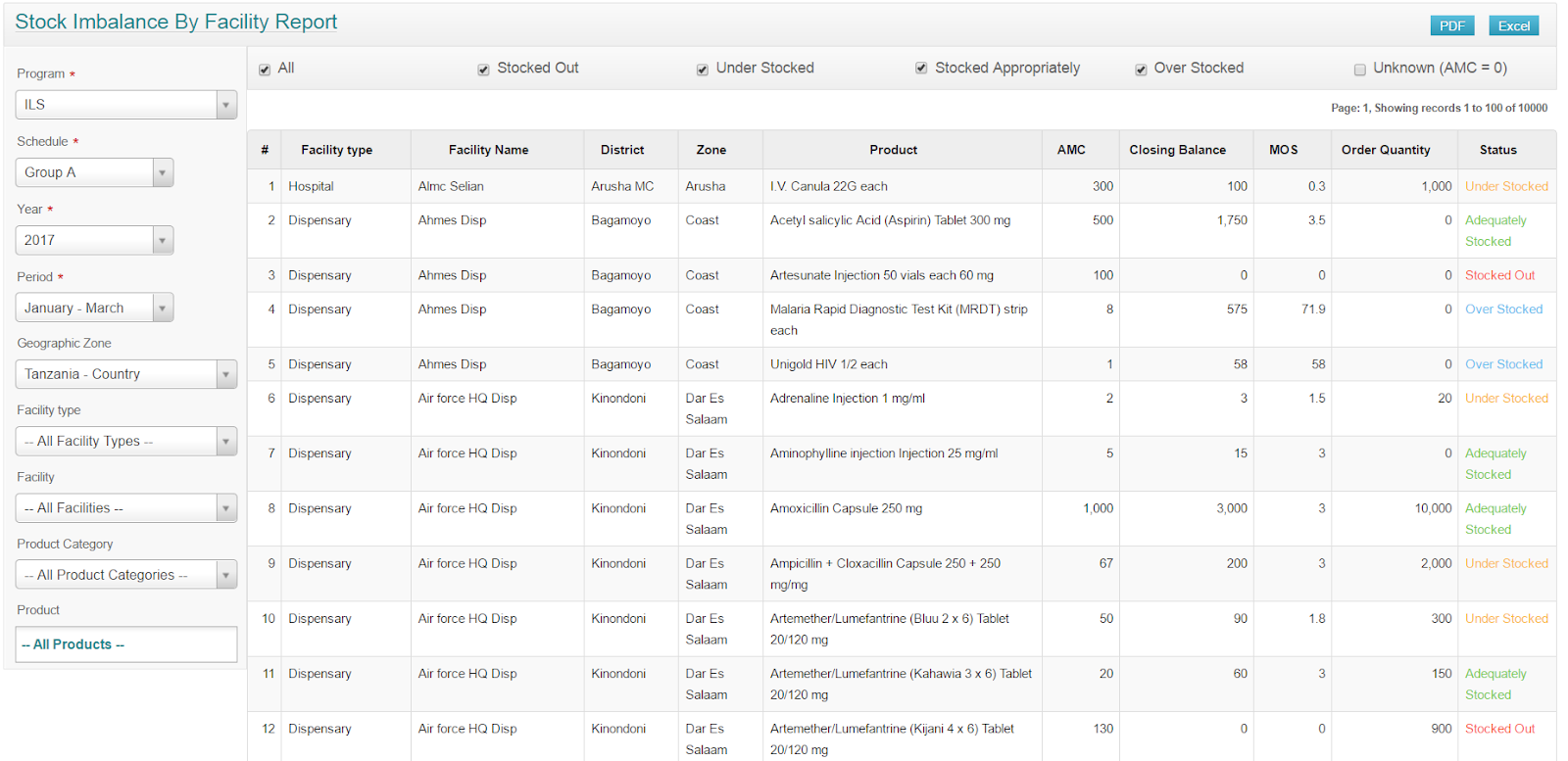
The stock imbalances report by facility shows lists of facilities that are stocked out, over stocked, under stocked; and to identify products which facilities have left out of the R&R which they should have included.
Status in eLMIS: In eLMIS
Status in OpenLMIS: Not implemented within OpenLMIS, can be created in Tableau
Priority: High priority
Background
The stock imbalance report shows lists of facilities and product combinations.
Use:
- Only counts from regular requisitions (emergency should be incorporated into regular)
- As the reports are being used, there is a shift to wanting notifications to alert people to the situation rather than requirement to look for that information
- Different users will want to see these things differently - also want to reduce the number of reports
- WHEN do people use this - it is retrospectively, different users will look at different times throughout the month/period
For each it shows:
- the average monthly consumption
- the closing balance
- the closing balance in terms of months of supply
- the ordered quantity.
- A status of “stock out” (0), “under stock” (months of supply < 3), adequately stocked (MOS 3-6), over stocked (MOS > 6) and unknown (AMC=0).
Parameters:
program
period (which can be an A / B / C quarter period)
stock status filter (all, or one or more statuses)
geographic filter which can be entire country or a subset
facility type filter (optional)
facility filter (optional)
product category filter (optional) - eg antibiotics, antimalarials etc - simpler way to shorten the report
product filter (optional)
Assumptions
User Stories
| # | Title | User Story | Label | Importance | Notes |
|---|---|---|---|---|---|
| 1 | See under and overstocked levels at facilities | As a logistic officer I need to have data on overstocked and understocked facilities so that I can decide on re-distributions of products to ensure they are not out of stock at facilities. | Tanzania eLMIS report | Must have | |
| 2 | Identify missing products on R&R for facilities | As a logistic officer I need to identify products which facilities have left out of the R&R which they should have included so that products are not out of stock in facilities. | Tanzania eLMIS report | Must have | ordered quantity on the report |
| 3 | Export reports to Excel | As a logistic Officer I need to be able to export all reports and analysis reporting results into Excel so that I can process the data more and analyze it in Excel. | Tanzania eLMIS reports | Must have | |
| 4 | Print reports with headings and logs | As a logistic officer I need to be able to print reports with customized headings and logos so that I can file a report for future reference. | Tanzania eLMIS reports | Must have |
Diagrams
Dependencies
| Description | Link |
|---|---|
Open Questions
Below is a list of questions to be addressed as a result of this requirements document:
| # | Question | Outcome | Status |
|---|---|---|---|
| 1 | For Tanzania user stories: review the users, "so thats" added, review the label, and review the priority level. |
Out of Scope
Related content
OpenLMIS: the global initiative for powerful LMIS software